Archive for the ‘codecharge’ Category
How to execute additional SQL in After Execute family events in CCS
Hi! This article is about how to execute some addtitional SQL after the primary SQL in the CodeCharge Studio’s Record has been executed.
Very often I have to perform some additional manipulations with the database after the Record submission. In this article I want to share the approach I use to reach the desired result. If you use a different approach to reach the same result I’m waiting your comments! 
Hiding Link by condition in CCS
Once my friend asked me about how to hide the Link in CodeCharge Studio by the condition. For example, suppose that we want to hide the Link if the one particular parameter exists in the GET request. I tryed to show it quickly to him but I wasn’t able. I added Hide-Show Component action to the Before Show event of the page. Link still was there. I was confused.
UTF-8 problem in CCS monolingual project
 Hi everybody! I’ve just run into an obstacle related with UTF-8 encoding in CodeCharge Studio. I have a one language project. The project is in russian. I want to use UTF-8 for my project but the project isn’t internationalized. So, I removed the english language and added a russian. Also, I turned off the using of internationalized features (Project Settings -> Locales and Encodings -> Use internationalized features) because the project isn’t multilingual. As a result, I have a corrupted text (question marks everywhere).
I started to experiment. The problem was in checkbox “Use internationalized features”. After I checked it the encoding fixed! Huh!
Changing HTML standards of an existing CodeCharge Studio project
I’ve just tryed to change the template type of an exiting project in CodeCharge Studio. To my surprise, there isn’t an option in CCS to change the project template or Section508 compatibility.
When you create a new project in CodeCharge Studio, it allows to create a project that is compatible with HTML or XHTML standards. Also, there’s an option that turns on Section508 compatibility.
But what should you do when you need to change these options of an existing project?
Simple ajax editing in CodeCharge Studio
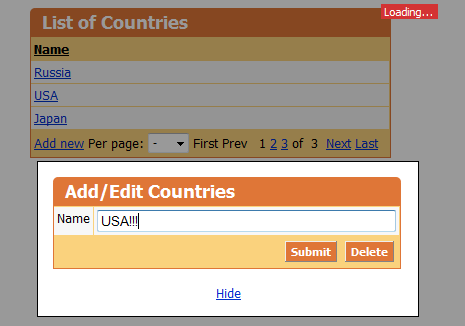
How to implement an Ajax editing in CodeCharge Studio like in the picture above? Is it easy or not? Yes, it’s easy! It takes a half an hour at the maximum. In this article, I will provide step by step instructions. Also, you can download an example here.
The main idea of this example is the ajax editing without the page refresh. When you click a link in the Grid the Show Modal dialog is opened. The Show Modal dialog contains a Record that allows to edit the data. All the actions are performed inside the Update Panels. Well, stay reading and you will see how to do it…
Centering horizontal CSS menu
It’s a real headache to center a fluid block element horizontally with help of CSS. Some time ago I figured out how to center CodeCharge Studio’s CSS Menu because it doesn’t provide this functionality. In general, any block element without the fixed width can be centered with help of this method.
By the way, if You have a fixed width block then You have to set its left and right margins to auto and You get the block centered.
In this article I’m going to explain the method I use to center a fluid block element. Here is the Demo.
Creating dialog in CodeCharge Studio
 This article provides CodeCharge Studio developers with a truly easy way to create a custom IDE dialog for different purposes. Here You will learn how to extend CodeCharge Studio with Your own dialog. I am going to explain how to create a custom dialog through an example. We will create together a dialog for embedding a Flash movie into the page. See online example to understand what You will be able to do with help of the dialog. Also, here You can download a source code of the dialog and extend Your CodeCharge Studio with it. In addition to downloading a source code You can download a test project that has a page where a Flash Movie embeded by this dialog. So, let’s start!