Archive for the ‘css’ Category
A collection of website design tools
In this note I am just sharing a great collection of tools for web designers.
It’s .
I find it very useful for me because often happens you quickly want a specific high quality CSS generator, for example, for color schemes or gradients, and you spend a long time to find it searching in Google or DuckDuckGo.
In this collection of web design tools you can filter tools by tag. For instance, if you want to get all the CSS button generators, just filter tools by “button” tag. So, this collection of tools for web designing allows you to find tools you need very fast filtering them by tag or using the search.
To quickly do something it should be online!
The collection contains only online, free and high quality tools for web design. Such as, online gradient generators, CSS buttons builders, CSS and JavaScript code compression tools, color scheme generators, sandboxes, different css and markup validators and so on and so forth.
In conclusion, just visit it 
In this note you’ll find some simple css styles that help to align facebook and twitter buttons in the one line.
Here’s the HTML of the buttons:
<div class="fb-like" data-send="false" data-layout="button_count" data-width="100" data-show-faces="true"></div> <a href="" class="twitter-share-button" data-via="user">Tweet</a> |
Here’s the css styles that fixe the alignment:
.fb-like { vertical-align: top; } .fb_iframe_widget span { vertical-align: text-top !important; } |
BTW, I include facebook icon with help of HTML5 method.
How to center an image horizontally in CSS
It’s possible to center some text in the paragraph by using text-align CSS property. Also, you aren’t limited only by the paragraph, it’s possible to center the text inside any other container, for example, inside div, h1, blockquote etc. Just set text-align property to center and you’ll get the text centered.
Fortunately, you can use such approach for images to align them by center, also! Just set text-align with a center value for the image’s parent element and you’ll get it centered horizontally.
1 2 3 |
<div class="image-container"> <img src="image.png"> </div> |
1 2 3 4 5 6 7 |
.image-container { text-align: center; } .image-container img { display: inline-block; } |
Notice that you cannot align an image by center if you’re using float property with left or right values for the image. Also, text-align property doesn’t take an affect if the image has display other then inline or inline-block which is a default display for images in the most of browsers.
Try it here http://codepen.io/starikovs/pen/iqxms.
By the way, to center an image vertically you can use the described in the article vertical align block element inside block element.
CSS background transparency
This note is about applying a transparency or opacity for background in CSS. Notice, that it isn’t possible to set the transparency for background property specifying it in the property definition. So, you need to use some CSS trick to achieve you want.
My way to apply opacity for background:
1. Create new z-index context for the element with the background. This is a container element.
2. Add :before pseudo element for that container element. It will have a background layer with opacity property.
3. :before element should be pozitioned under any other elements in the container element. So, set z-index “-1″ for it.
4. Set a background for the :before element and stretch it to the container element.
I think that’s all. Here’s the code snippets:
1 2 3 |
<div class="container"> <p>Lorem ipsum dolor sit amet..</p> </div> |
1 2 3 4 5 6 7 8 9 10 11 12 13 14 15 16 |
.container { position: relative; z-index: 0; } .container:before { background: url(bg.png); position: absolute; bottom: 0; content: ' '; left: 0; opacity: .5; right: 0; top: 0; z-index: -1; } |
Try it here http://codepen.io/starikovs/pen/zGugk.
Fallback for background-color for old browsers
Unfortunately, I haven’t been used the fallbacks yet. I’ve just found out that some of rgba colors in IE8 are just transparent. This note is about the fallbacks for old browsers. When you’re using such features like rgba colors don’t forget about the fallbacks. In CSS, first you should write the fallback color for old browsers and then your rgba color. Here’s an example:
1 2 3 4 |
.test { background: #000; /* fallback */ background: rgba(0, 0, 0, .8); } |
So, if the browser doesn’t understand rgba color it won’t apply it but apply the background-color above that it understands. The fallback should have rgb or hex values because old browsers understand them.
I test it on IE8.
Try it here http://codepen.io/starikovs/pen/omiCk.
Empty and non empty attribute selectors in CSS
This note is about empty and non empty attribute CSS selectors.
To select some elements in CSS by attribute value we should use attribute selectors. There’s an attribute selector that matches elements when their attribute exactly equals to a specified value in the selector.
1 2 3 |
[attribute='value'] { } |
So, to select elements with an empty attribute we should use the following CSS:
1 2 3 |
div[data-attr=''] { } |
Unfortunately, there isn’t “not empty” attribute selector but we can get the same effect using :not() selector: Here’s an example:
1 2 3 |
:not([data-attr='']) { } |
You can try it here http://codepen.io/starikovs/pen/tngqH.
How to stretch background image with CSS
There’re some jQuery plugins that help to stretch background image on the body or other HTML elements. It’s not a hard task to make background image covering HTML element with help of JavaScript by adding a resizable img tag. But what about CSS? Is it possible to make that stretching using just CSS? Fortunately, it’s possible!
To stretch background image on the HTML element you should use background-size CSS property with cover value.
1 2 3 4 5 6 7 |
body { background: url(image.jpg) fixed no-repeat; -webkit-background-size: cover; -o-background-size: cover; -moz-background-size: cover; background-size: cover; } |
Here’s the example:
Try it here http://codepen.io/starikovs/pen/aDyGI.
Responsive CSS menu with a disappearing “Menu” button
The idea of this menu is that it has a “Menu” button to open a menu in small screens. When the menu’s been opened the “Menu” button is hidden. It’s pure CSS responsive menu with no JavaScript through :target CSS pseudo class. Let’s walk step by step on concepts of this menu:
1. It’s looked like a classic horizontal menu on the desktop. The menu has inline-block items.
2. The menu has a main container with a certain id, for example, “menu”. Here’s the HTML for the menu:
1 2 3 4 5 6 7 8 9 10 11 12 13 14 |
<div id="menu"> <div class="menu-container"> <a href="#menu" class="menu-button">Menu</a> <div class="menu"> <a href="#">Home</a> <a href="#">Blog</a> <a href="#">News</a> <a href="#">Forum</a> <a href="#">Support</a> <a href="#">About</a> <a href="#" class="active">Contact Us</a> </div> </div> </div> |
3. Besides the menu, there’s another container that has a hidden link by default. It’s a “Menu” button for responsive. Also, this container has the menu itself.
4. The “Menu” button has “#menu” as a “href” attribute value. This allows to scroll the screen to “menu” id when the “Menu” button is clicked.
5. If there’s an id on the page that is matched to URI part after “#” the :target CSS pseudo class points to the element with this id. This allows to detect when the “Menu” button is clicked.
6. When the small screen is detected (with help of CSS media queries), the menu is hidden and the “Menu” button is shown. Also, the display property is changed from inline-block to block for menu items for responsive.
7. With help of :target the “Menu” button click is detected and based on :target the button’s hidden and the menu’s shown.
Here’s the CSS:
1 2 3 4 5 6 7 8 9 10 11 12 13 14 15 16 17 18 19 20 21 22 23 24 25 26 27 28 29 30 31 32 33 34 35 36 37 38 39 40 41 42 43 44 45 46 47 48 49 50 51 52 53 54 55 56 57 58 59 60 61 62 63 64 65 66 67 68 69 70 71 72 73 74 75 76 77 78 79 80 81 82 83 84 85 |
/* Links */ a, a:link, a:visited, a:hover { color: #fff; text-decoration: none; } /* Menu */ .menu-container { border: 1px solid #999; border-radius: 5px; margin: 0 auto; padding: 20px; width: 500px; } /* Menu items */ .menu-container a { background: #1E90FF; border-radius: 5px; display: inline-block; padding: 5px 10px; -moz-transition: background-color .3s; -o-transition: background-color .3s; -webkit-transition: background-color .3s; transition: background-color .3s; } .menu-container .active { background: #FFD700; color: #555; } .menu-container a:hover, .menu-container .active:hover { background: #ADD8E6; color: #555; } /* Responsive Menu Button */ .menu-container .menu-button { background: #999; display: none; } /* Responsive */ all and (max-width: 550px) { .menu-container { width: 50%; } .menu-container .menu-button { display: block; } .menu-container .menu { height: 0; opacity: 0; overflow: hidden; -moz-transition: opacity 1s ease-out; -o-transition: opacity 1s ease-out; -webkit-transition: opacity 1s ease-out; transition: opacity 1s ease-out; width: 100%; } .menu a { display: block; margin: 1px 0; } #menu:target .menu { opacity: 1; height: auto; } #menu:target .menu-button { display: none; } } |
Try it here http://codepen.io/starikovs/pen/kIrdo.
Setting width for “display table” element
I’m implementing a simple layout with “display table” approach at the moment. I’ve been confused a lot, when I set the width for the table it’s ignored. I have big images in layout cells with “max-width 100%”.
For instance, there is a div element with “display table” and it has 800px width, also it has two divs with “display table-cell”, each cell has a big image as a content. In Chrome everything works well but in FireFox there’s a problem the width of table is ignored. Table cannot have a width less then 800px but if you have lots of contents table will grow.
To fix this behavior use table-layout fixed:
1 2 3 4 5 6 7 8 |
<div class="layout"> <div class="layout-cell"> Lorem ipsum... </div> <div class="layout-cell"> <img src="big_image.jpg"> </div> </div> |
1 2 3 4 5 6 7 8 9 10 11 12 13 14 15 |
.layout { display: table; width: 800px; /* try to remove this to test, in FF for example */ table-layout: fixed; } .layout-cell { display: table-cell; } img { max-width: 100%; } |
Try it here http://codepen.io/starikovs/pen/BrDKv.
Read more about CSS table-layout Property.
CSS navigation arrows?
Recently I’ve tried to create some arrows for navigation with “previous” and “next” links. The main idea is of using some unicode arrow characters to associate them with previous or next directions. Yes, it’s left and right arrows
By default, I use Helvetica, Arial, sans-serif font family. As you can see on the picture below there’s a problem with UTF-8 arrows, they’re looked badly. This look depends on the font size. It’s possible to pick a font size when these arrows will be looked nicely.
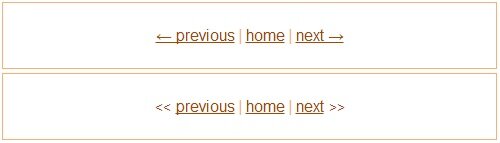
I’ve played with the arrows for a while. It’s strange. If you’re going to use such approach just test before with the different font sizes. Just pick a suitable font size for the arrows, that’s all I’ve decided that I won’t use these arrows because of font size in percentage in my case. I prefer the second variant with < and > text.
HTML and CSS for arrows with unicode symbols:
1 2 3 4 5 6 7 |
<div class="nav"> <a href="#">? previous</a> <span class="separator">|</span> <a href="#">home</a> <span class="separator">|</span> <a href="#">next ?</a> </div> |
1 2 3 4 5 6 7 8 9 10 11 12 |
.nav { font: 16px/1.6 Helvetica, Arial, sans-serif; } a, a:link, a:visited { color: #a64600; } a:hover { color: #bf6d30; text-decoration: none; } |
HTML and CSS for arrows with < and > text:
1 2 3 4 5 6 7 |
<div class="nav nav-alt"> <span class="arrow"><<</span><a href="#">previous</a> <span class="separator">|</span> <a href="#">home</a> <span class="separator">|</span> <a href="#">next</a><span class="arrow">>></span> </div> |
1 2 3 4 5 6 7 |
/* In addition to CSS above. */ .nav-alt .arrow { color: #a64600; display: inline-block; margin: 0 5px; } |
Try it here http://codepen.io/starikovs/pen/Fapwk.